Presenting at an Online Symposium

A symposium session is live, online, and on Chicago (US Central) time. Your panel runs at a set hour on Zoom, you join it from the session listing at the panel's start, and you have fifteen minutes. That is the whole of it, and it is worth knowing before the day.

A Symposium is Online Only

The Imagining Futures symposia — Imagining Creative Worlds, Human Worlds, Social Worlds, Sustainable Worlds — have no venue and no on-site program. Everything live happens on Zoom; everything else sits on your presentation page in CGScholar. The schedule's mode dropdown offers only the two modes a symposium runs, so there is nothing on-site to look past.

  • Live themed paper sessions — a panel of related papers presented one after another, then a facilitated discussion. If you were accepted to present live, this is your session, and this page is about it
  • Asynchronous presentations and posters — viewed on demand on their presentation pages, with no time slot. See Asynchronous sessions.
  • Plenaries, Talking Circles, learning and service sessions — live, listed on the schedule as symposium events, visible in every mode.

A live paper is presented once, at the hour on the schedule. Being there, at that hour, is the presentation.
Confirm your time, then convert it

Before the symposium, open the schedule, find your panel, and check its day and start time against the time you were given. Every live session in the series is scheduled in US Central Time (Chicago). The schedule shows that time and does not convert it to yours.

  • The zone is printed once, in the event header beside the dates, as a GMT offset — GMT-6 for Chicago in November — and applies to every time on the schedule
  • Convert your panel's start time to your own clock and put it in your own calendar, with a reminder
  • Use the offset for the symposium's dates, not today's. US clocks change in March and November; a symposium a week after the change is an hour out if you converted early
  • If the time on the schedule is not the one you expected, raise it through the event's ··· menu (Support) before the day, not during it

Your own calendar is the only alarm you will get. Nothing on the platform knows what time it is where you are.

Find your panel and its Zoom link

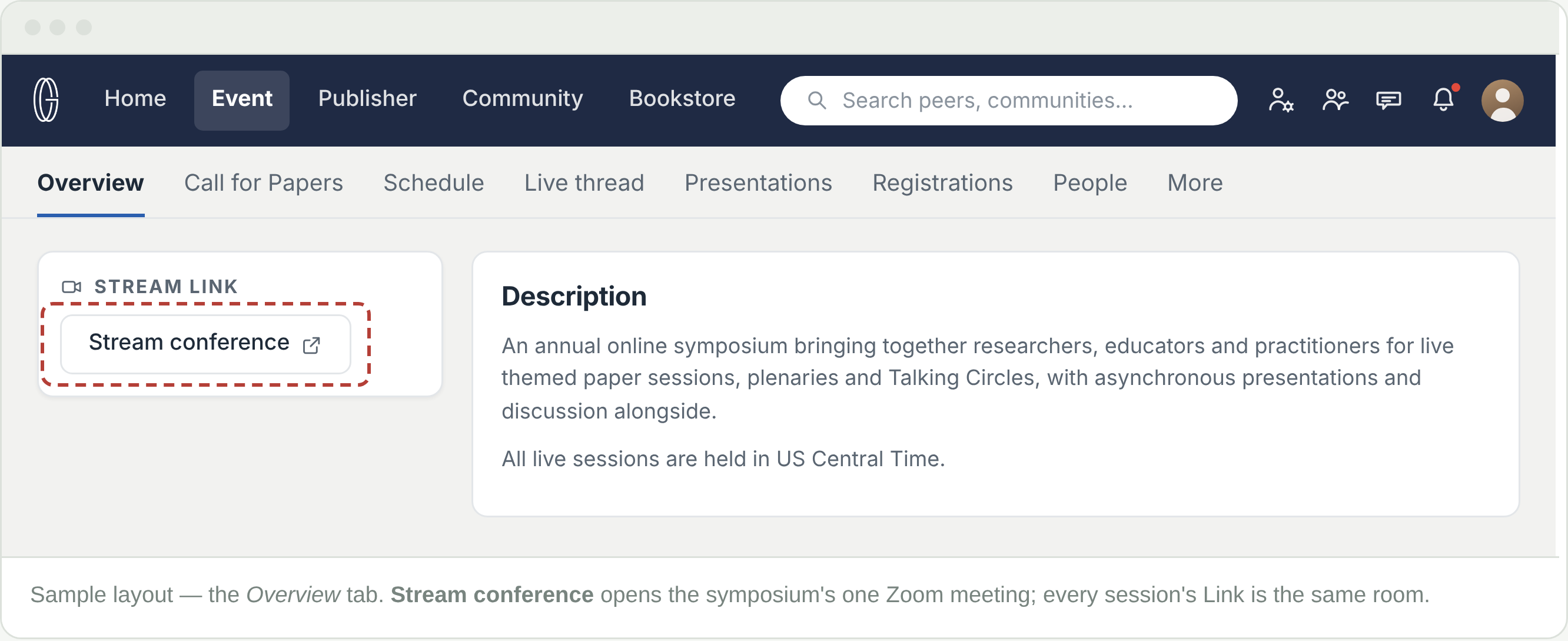
Papers are grouped into themed panels — a session with a name and a time span, holding three or four papers that run one after another. The whole symposium runs in one Zoom meeting.The same link sits on every session listing, so you join that room at your panel's start time and the facilitator takes it from there.

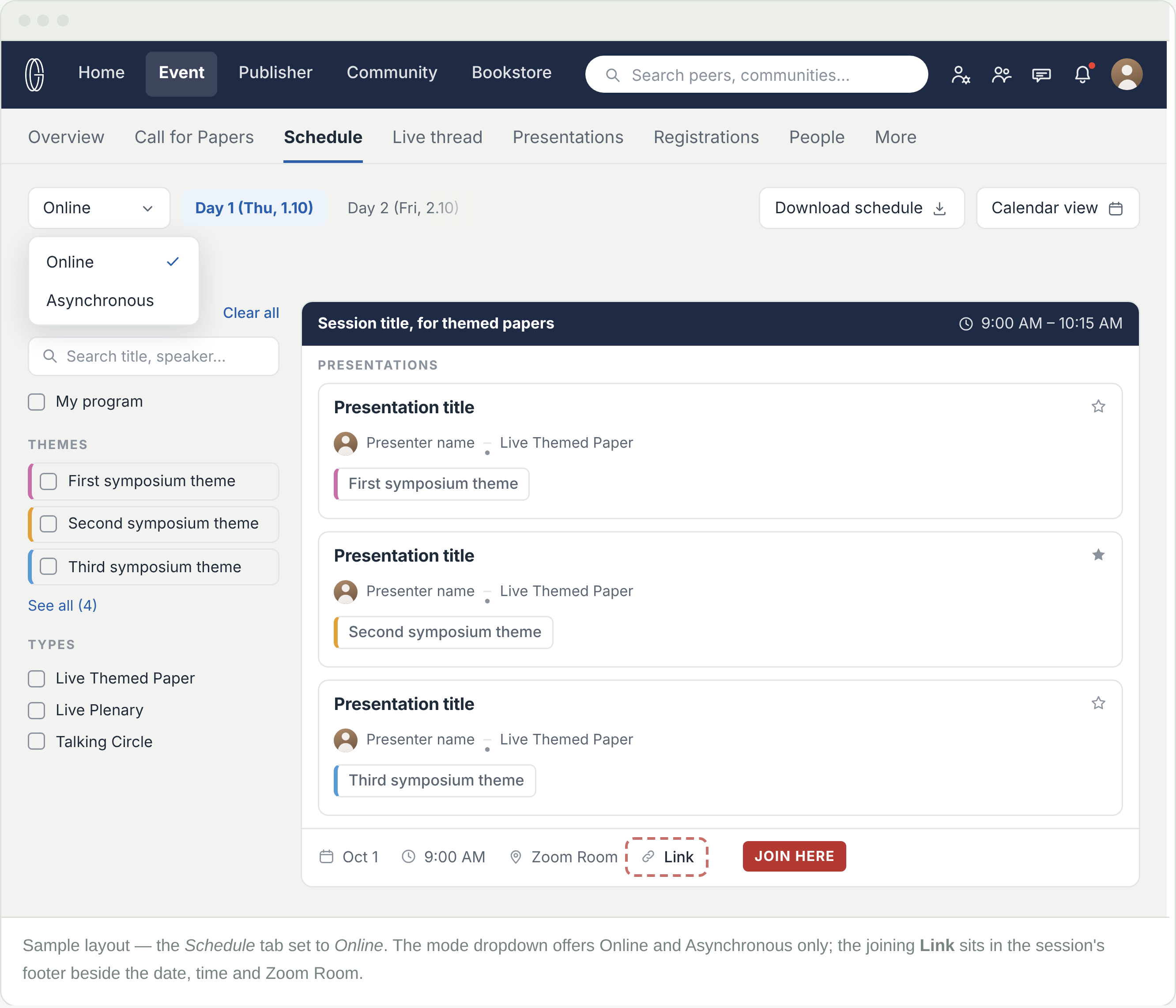
  • Open the Schedule tab in list view, set the mode dropdown to Online, and pick your day
  • Find the session block — the name and the full time span — not your paper's title beneath it
  • The joining link is the Link item, with a chain icon, in the session's footer row beside the date, time and room. The same Link sits in Container details if you open the session. It appears once the link is active; sign in with your registered account if you are asked to
  • Click Link at the session's start time and Zoom opens

The quickest way in is the Stream link box at the top of the event's Overview tab: Stream conference is that single Zoom link. The Link on your session listing opens the same meeting — use whichever is nearer to hand.

Looking for a link on your own presentation page is the commonest way to be locked out of your own panel. The link is on the session listing and under Stream conference on the Overview tab — the same Zoom room either way.


On the day: how a panel runs

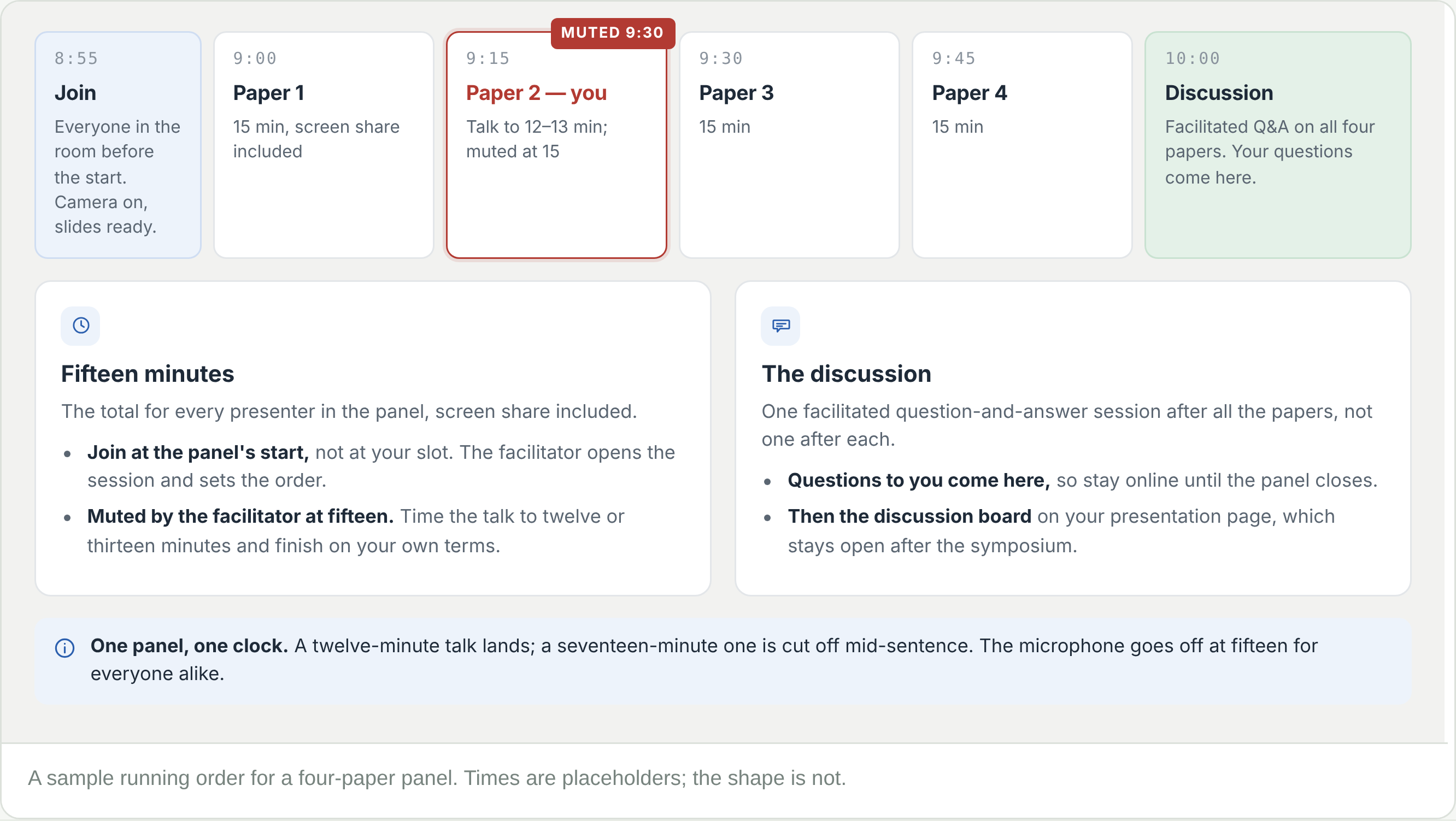
A panel is one Zoom session, one running order, one clock. The same four rules apply to every presenter in it, so that each gets the same time.

  • Join at the panel's start time, not at your slot. The facilitator opens the session, sets the order and introduces the papers. Arriving for your own paper means arriving late
  • You have fifteen minutes, and screen sharing is inside them. The time it takes to find and share your slides comes out of your fifteen
  • At fifteen minutes the facilitator mutes you and moves to the next paper. Time the talk to twelve or thirteen minutes and finish on your own terms
  • Stay for the discussion. A facilitated question-and-answer session follows all the papers. Questions to you come then, not after your slot, so remain online until the panel closes

Fifteen minutes is the total, for everyone alike, and the microphone goes off at the end of it. A twelve-minute talk lands; a seventeen-minute one is cut off mid-sentence.


Before you go live

Fifteen minutes leaves no room for setting up. Everything below is done before you click the link.

  • Zoom installed and up to date on the machine you will present from, signed in under the name on your presentation so the facilitator can find you
  • Slides open and ready to share before you join — not opened inside your fifteen minutes
  • Screen sharing tested on that machine, in a test meeting, including any video or audio in the slides
  • Camera and microphone checked; headphones if there is any echo
  • The strongest connection you have — wired if possible — and a phone with the Zoom app as the fallback
  • The talk timed at twelve to thirteen minutes, out loud, with the slides
  • Your panel's start time converted to your own clock and in your calendar

Join a few minutes before the start, camera on, slides behind the Zoom window. The first thing the facilitator sees should be a presenter who is ready.

After your session

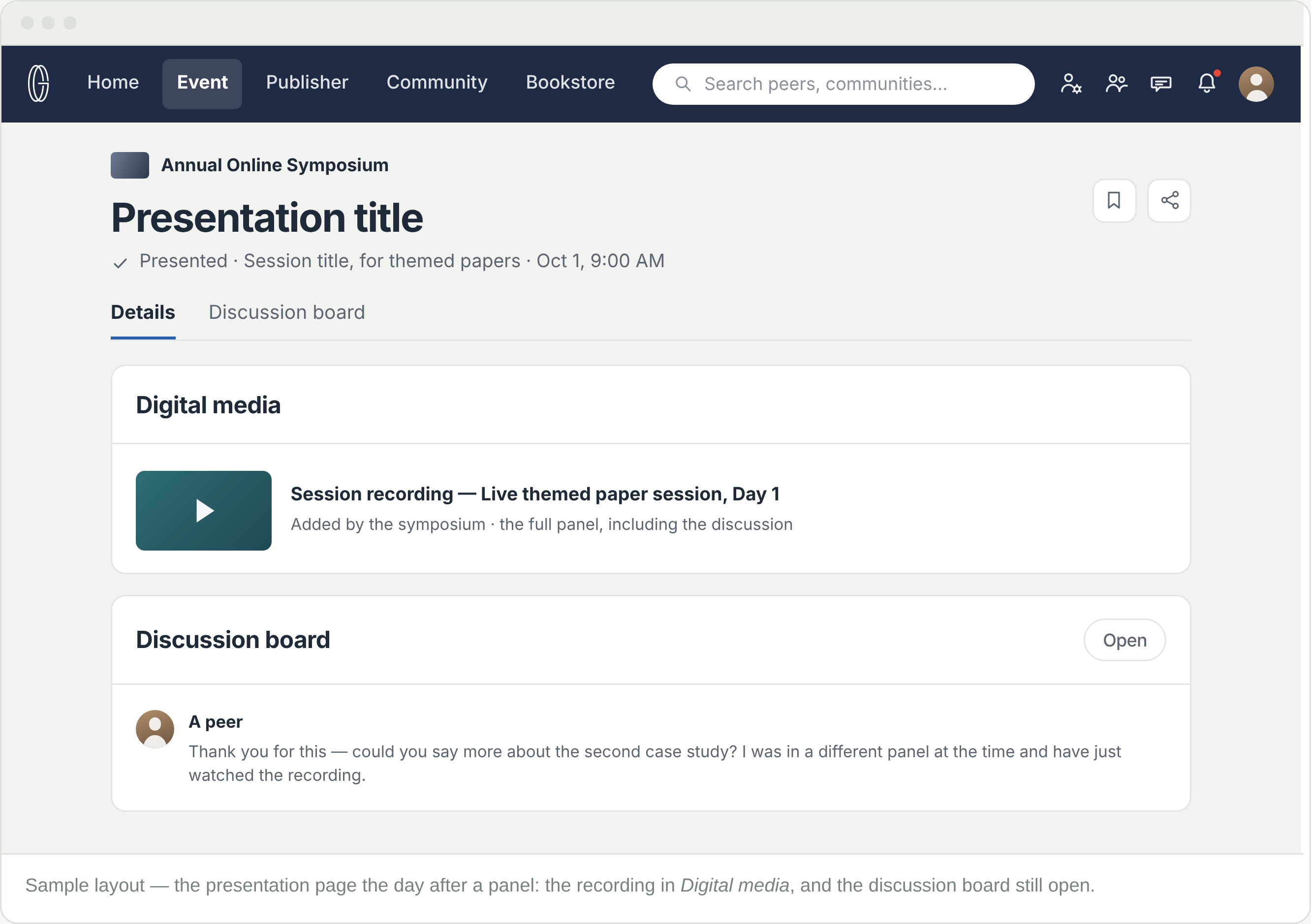
Every live panel is recorded, and the recording is posted to your presentation page within 24 hours. That page is what outlasts the live hour — the recording, your abstract, a discussion board that stays open after the panel closes, and any digital media you choose to add.

  • Look for the recording the day after your panel. No notification is sent when it lands; open your presentation page to find it
  • Digital media is optional for live presenters. If you want your slides or a paper beside the recording, add them to the presentation page; nothing is required of you
  • Watch the discussion board. A question posted a fortnight later still reaches you — an in-app notification and an email, however long after the panel
  • Follow the publication pathways. Each symposium works toward proceedings, journal articles and curated volumes; see Publication Pathways

The live hour ends. The recording, your presentation page, and the conversation on it do not.


Frequently Asked Questions

Is there one Zoom link for the whole symposium?

Yes. The symposium runs in one Zoom meeting. Stream conference on the event's Overview tab opens it, and the Link in every session's listing is the same meeting. What changes from panel to panel is the time, not the room.


My paper is last in the panel. Can I join when it is my turn?

No. Join at the panel's start time. The facilitator opens the session and introduces every paper, and the order can only be kept if everyone is in the room from the start.


What time is my panel where I am?

You have to work it out. All live sessions are in US Central Time (Chicago), printed once in the event header, and nothing converts to your zone. Convert your panel's start time and put it in your own calendar.


What happens when my fifteen minutes are up?

The facilitator mutes you and moves to the next paper. Screen sharing counts inside the fifteen, so have the slides ready before you join and time the talk shorter.


Can I share slides?

Yes, through Zoom's screen share, inside your fifteen minutes. Have them open before the panel starts.


Is my session recorded?

Yes. Every live panel is recorded and the recording is posted to your presentation page within 24 hours. You do not need to upload digital media of your own, though you can add slides or a paper beside the recording if you want them there.


I cannot make my scheduled time.

Raise it as early as you can, through the event's ··· menu (Support). A slot cannot be moved on the day.


Do I need to be registered to see the schedule and the link?

Yes. The programme, the joining link, the media and the discussion boards all sit behind a registration.


Can people ask me questions after the panel?

Yes, on your presentation's discussion board. You get an in-app notification and an email, however long afterwards it is.